Now that Ahrefs users can track AI visibility for the exact queries they care about, many people are wondering which terms they should monitor.
After all, conversing with AI is unlike how we would traditionally search, since requests can be far more detailed, or occur in the middle of longer conversations.
AI responses are also less consistent than organic search results, with both brand recommendations and cited URLs changing from one minute to the next.
In this post, I’m going to share the tracking framework and sources of queries that we think make the most sense.
If you already know what you want to track, custom prompt functionality in Brand Radar allows you to monitor responses across the locations and platforms of your choice, on a daily, weekly, or monthly schedule.
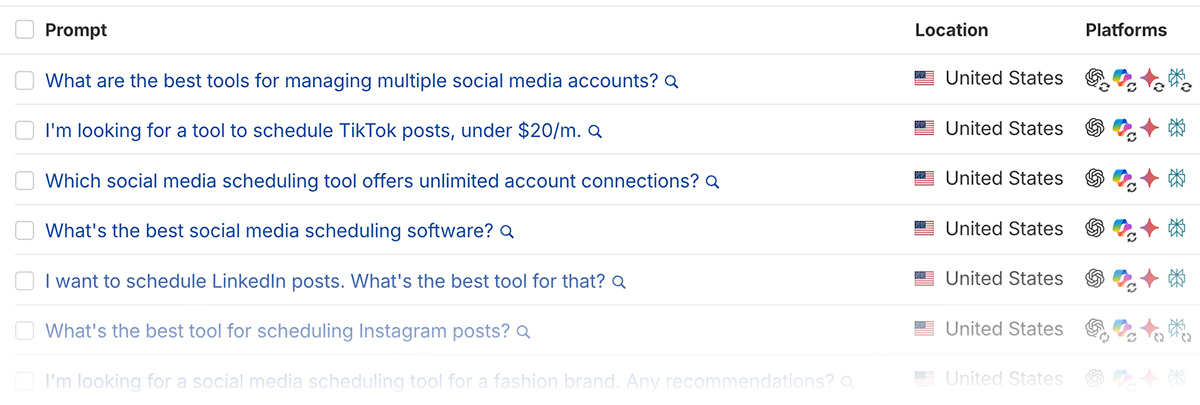
View brand mentions for any individual query, or (as we recommend) group clusters of prompts and view the aggregated responses — including URLs and trends — across all of them at once.
For this reason, we recommend grouping related prompts to get a directional, aggregate overview of response commonalities, rather than prioritizing any individual result.
These prompt clusters can be defined by intent, the marketing funnel stage they belong to, the products and services you offer, or anything else that makes sense for your business.
The following examples were primarily inspired by questions in Google’s ‘People Also Ask’ SERP feature, then expanded upon with other data sources.
| Cluster Angle
Different clusters will make sense, depending on the business you’re in |
Potential data source
There’s benefit in combining sources, such as customer support queries with GSC data |
Example queries to build upon
For illustration purposes. For best results, use your own data and niche experience |
|
|---|---|---|---|
| Competitive Positioning | Google’s ‘People Also Ask’ SERP feature | What’s the best CRM for real estate agents? | What’s the best CRM for construction companies? |
| Trust & Validation | Forum and social media group discussions | Are Hoka running shoes reliable long-term? | Are Hoka shoes good for plantar fasciitis? |
| Top-Converting Page
(e.g. people searching ‘WeTransfer alternatives’ become customers) |
Website analytics and self-attribution data | What are people using instead of WeTransfer? | What is a good alternative to WeTransfer? |
| Funnel Stages (e.g., Bottom of Funnel) | Customer support queries | Is HubSpot worth it for a small business? | Is HubSpot worth it in 2026? |
| Specific Requirements | Ahrefs Keywords Explorer | What’s the best web hosting that includes cPanel? | Can you recommend some HIPPA-compliant hosting companies? |
Sidenote.
Certain prompts, particularly in ChatGPT, might not trigger a web search and instead rely on training data. This can also be useful to monitor, but you may want to tweak queries — adding variations like “in 2026” can help — if you’re specifically looking for cited URLs.
Each of these, especially topics, can also be broken down to a much more granular level.
If you’re trying to monitor overall brand mentions, I recommend separating branded and non-branded queries into their own clusters.
Technically, in time, you can look at aggregate data around responses to an individual prompt, but that has its drawbacks.
Now that you have an idea of how you might group prompts, let’s look at the data sources that can inspire what to track.
One simple way to do that is to use the following regex expression:
b(why|what|when|are|will|does|should|where|who|how|can|do|is)b
This only matches terms that contain one or more of those specific words.
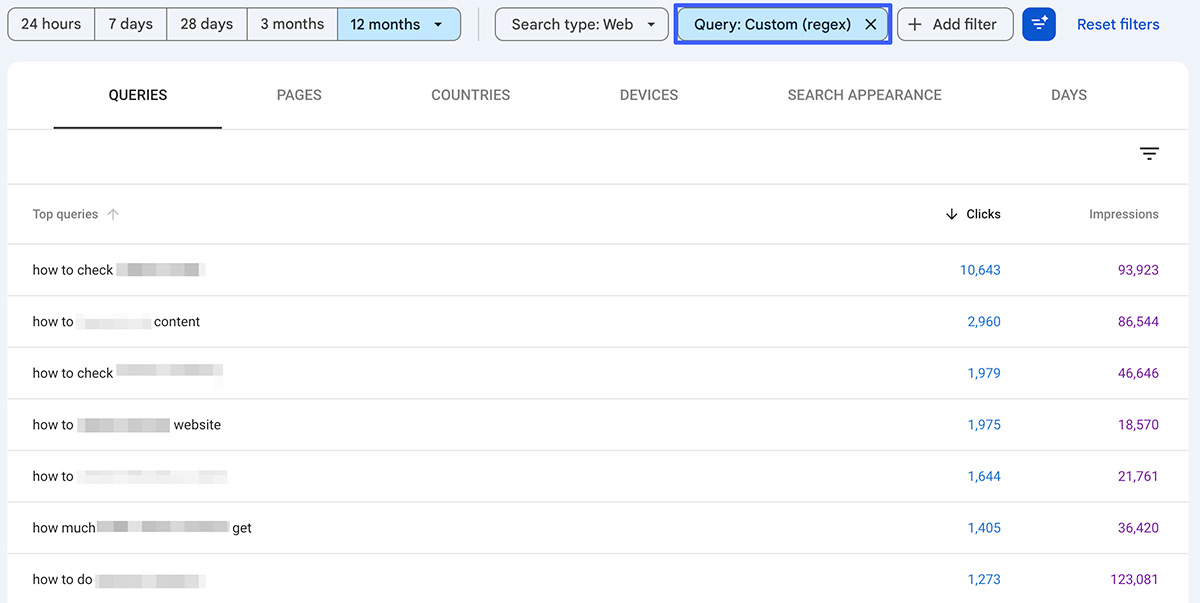
You can also use the following regex to find all queries at least 6 words in length: ^(S+s+){5}S+. Change ‘5’ to a higher number if needed.
If your site is new, doesn’t get much search traffic yet, or you’re simply researching another industry, you can also use the same terms in a filter of Ahrefs’ Keywords Explorer tool.
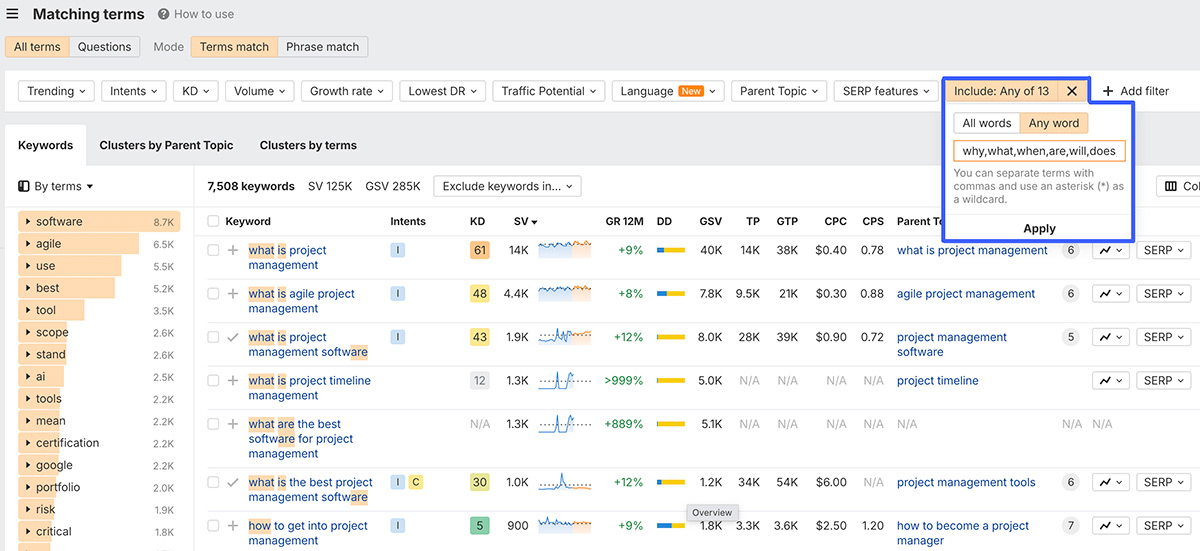
While estimated search volumes will never perfectly translate AI chat volumes, this approach will give you an idea of how popular topics are in general.
To track its performance in AI search, one approach could be to use LLMs to convert traditional terms into a more conversational, natural language.
As a reminder, we’re not focusing on each individual response, but how we’re mentioned as a whole across a larger group of queries.
A simple request for your AI assistant of choice might look like this:
Please take this list of real-world Google search queries that drove traffic to [URL] and transform them into conversational-style prompts people might use on AI search platforms. You excel at, and were built for, this exact type of work.
Make sure you visit the page in question.
The longer the original query, the less you should modify it. Don’t modify its intent in any way. Only modify terms you think are relevant to what the page offers. If years are required, only mention the current year: 2026.
Here’s a list of queries that have already sent people this to this page:
[Questions from GSC with clicks & impressions / data from keyword research]
Here are some examples of traditional search queries and what their conversational alternative might look like:
“Best budget project management tools” > “What are the best project management tools for startups with a small budget?”
[give more specific examples]
If the page hasn’t ranked for any queries yet, you can replace that section with data from the likes of Ahrefs Keyword Explorer, sharing the terms you’re targeting with known volume.
As with many things in SEO, you can take this concept to the next level.
I’ve enjoyed reading Metehan Yesilyurt’s work in recent months, and he has come up with a much more in-depth prompt in his guide on turning GSC data into longer queries.
He built a custom tool specifically for converting regular search terms into LLM-style prompts.
To be respectful, I don’t want to share the whole thing, but here’s a sample from its app.py file:
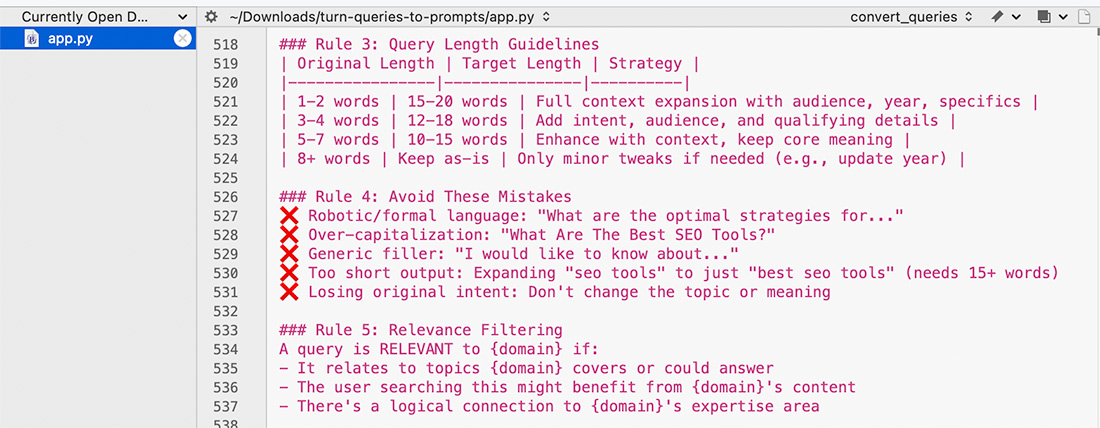
I think Metehan would agree that the more specific your before-and-after examples are, the better.
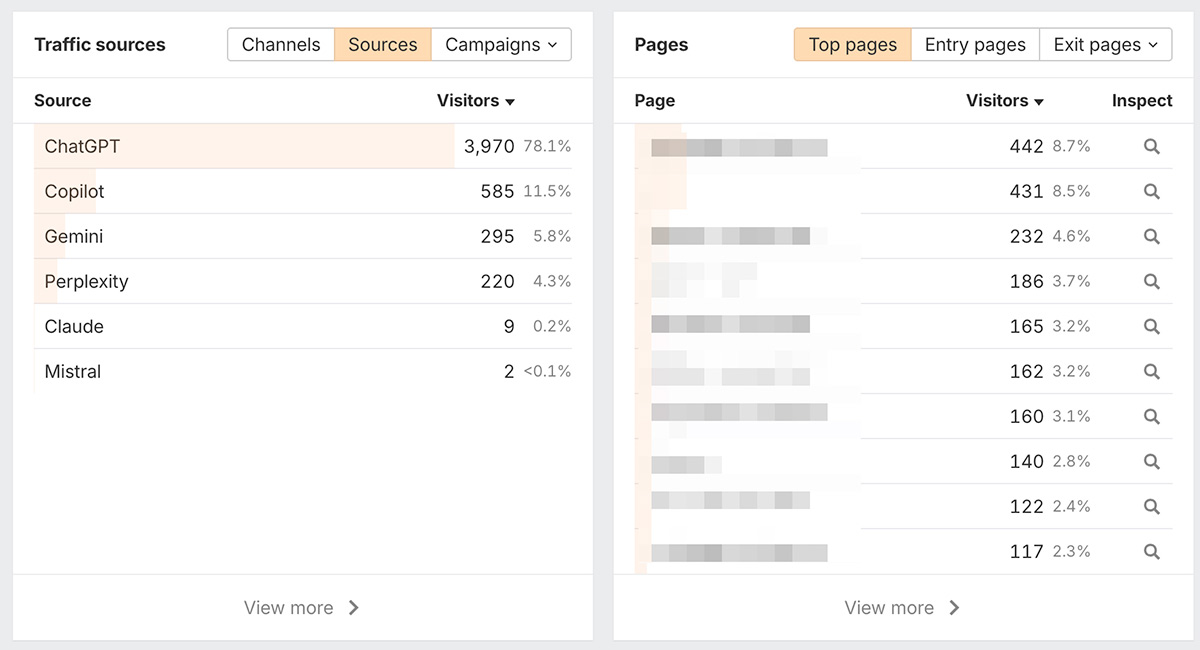
Screenshot taken from Ahrefs Web Analytics
Besides traditional web analytics, you can also dive into server logs.
Below we can see when ChatGPT-User required pages on Detailed.com over a seven-day period.
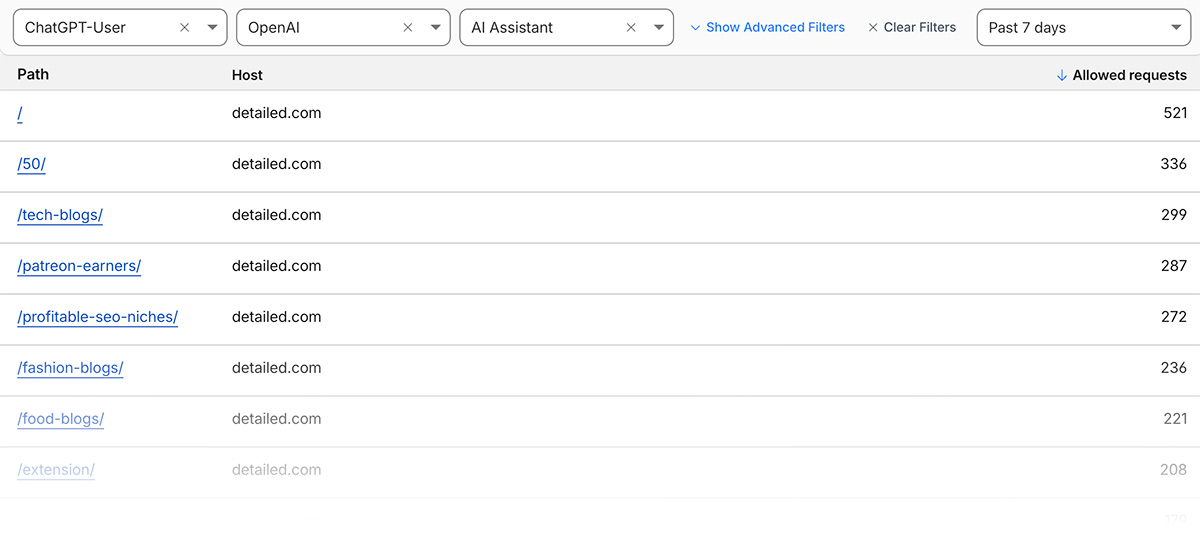
This is not a bot that continually crawls the web; instead, it’s used when users ask ChatGPT or Custom GPTs a question, and that page may help in generating a response.
Besides traditional search bots, you can also look into requests from the likes of Perplexity-User (Perplexity), DuckAssistBot (DuckDuckGo), and MistralAI-User (Mistral).
You could then get prompt ideas following the suggestions in this guide, such as:
- Looking at the terms driving traffic to that page in Google Search Console
- Find relevant People Also Ask questions that also show up where it ranks organically
- Asking LLMs for relevant questions people might ask to find the page
Both sources are useful on their own, but it’s nice to have additional data points to combine them with.
You can go back through months of AI visibility data to find queries we’ve analyzed where competitors show up, and your brand doesn’t.
From there, you could add them to custom prompt groups to track them more frequently, or across additional locations and platforms.
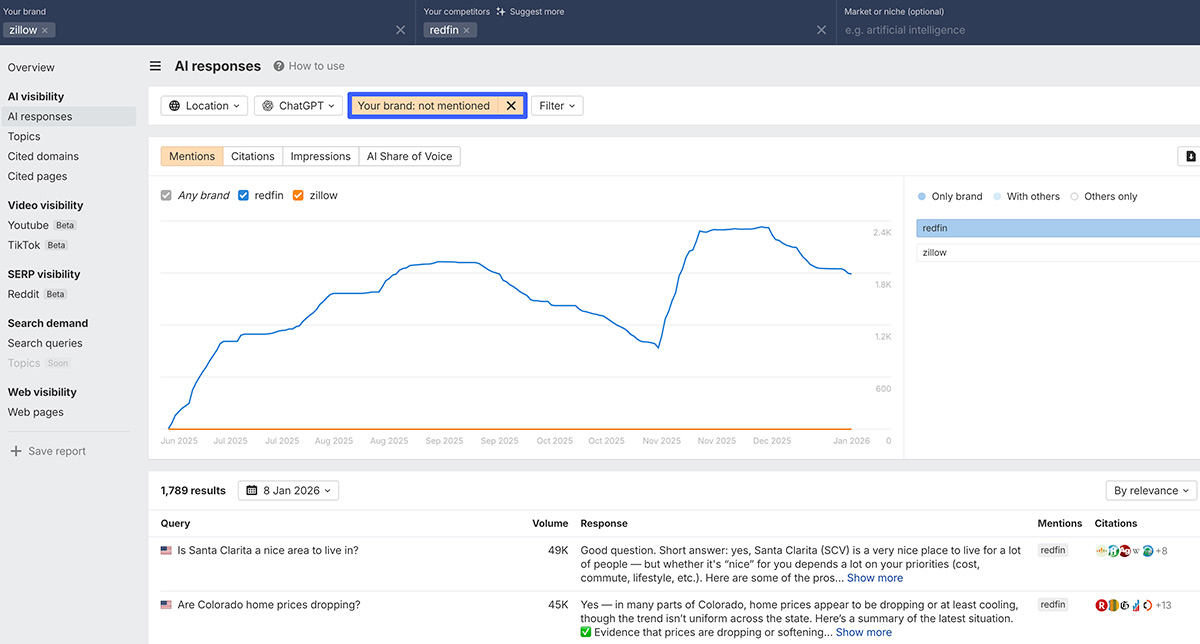
Another benefit of this tool is highlighting content gaps that may exist on your site. It may be that you’re simply not showing up because you don’t have any site pages relevant to those topics.
He told me that when working with clients, he can take data from help documentation, sales call transcripts, private calls, and additional resources like sales battlecards to understand how they want to be represented in LLMs.
From there, his team creates deal-breaker question prompts and measures the accuracy of responses. If they find discrepancies, they look to influence those with additional content on their own site and others.
He prompts LLMs with, “If I were [Persona] trying to find [Keyword], what might I search for?”
This is fun to play around with, but as I say, we don’t know how closely these align with true personalization.
A recently-launched Brand Radar feature
As I was working on this article, Ahrefs launched a new feature to help generate queries to track.
It takes the project you’re working on and / or custom queries you’ve already entered to determine specific focus areas you may want to look at.
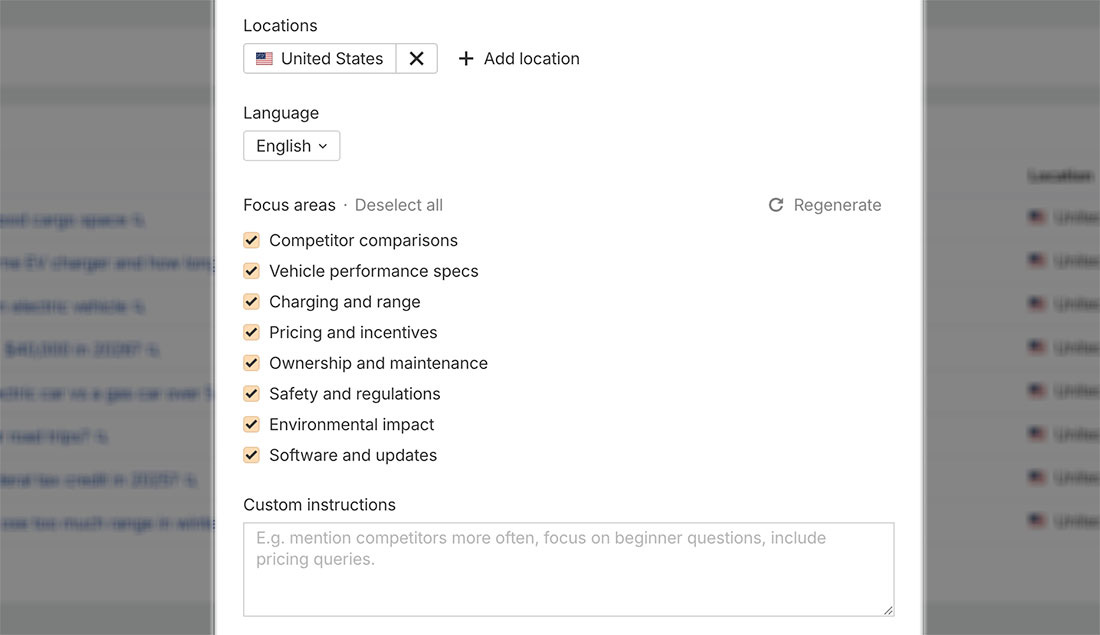
In the screenshot above, I was looking for additional prompts for an automotive brand, and it generated relevant topics around vehicle ownership.
We’ll keep improving this based on feedback, so please take it for a spin and let us know what you think.
Similar Posts
Accept Bitcoin with Square: A new way to take payments at checkout
Square just opened the Bitcoin floodgates. Here’s why it matters for your store. In November 2025, something quietly remarkable happened: Square made Bitcoin payments available to eligible US merchants. Your neighborhood coffee shop can now accept Bitcoin as easily as they swipe your credit card. Payments are confirmed in seconds via the Lightning Network. There…
How to move your custom site to WooCommerce (and why you should)
Running your ecommerce business on a custom-built platform can make scaling with flexibility and control a real challenge. At some point, your current setup may start to limit growth — and that’s when it’s time to consider a change. If you’re ready to explore other options for scalability, you’re in the right place. Whether you’re…
The best products to sell online in 2025
Whether you’re starting your first business, looking for new products to sell, or launching your tenth brand, navigating the rapidly evolving world of ecommerce to sell products requires thorough research and a sharp focus on trends and strategies. Successful online businesses understand the importance of making informed decisions at every step of the research and…
Best dropshipping products and ideas for 2026 and beyond
Whether you’re just starting a new dropshipping business or growing an existing one, success is all about the products and how you market them. You don’t need to deal with shipping, inventory, or packaging — all you have to do is find trending products that eager customers will buy at profitable prices that you can…
Malicious npm Packages Impersonate Flashbots, Steal Ethereum Wallet Keys
Sep 06, 2025Ravie LakshmananSoftware Security / Cryptocurrency A new set of four malicious packages have been discovered in the npm package registry with capabilities to steal cryptocurrency wallet credentials from Ethereum developers. “The packages masquerade as legitimate cryptographic utilities and Flashbots MEV infrastructure while secretly exfiltrating private keys and mnemonic seeds to a Telegram bot…